AmpliaOpen the app

Measure Diameter and Circumference on a Photo

Turn any photo into a caliper for round things. Calibrate one known distance, then click the two ends of the diameter — Amplia returns the diameter, the circumference, and the enclosed area at once.

  • Free Circle tool
  • No upload — measures in your browser
  • Phone, tablet, and desktop

How to measure a diameter on a photo

Any round object works — a pipe end, a tank lid, a tree trunk, a hole in a drawing. One known distance sets the scale; two clicks do the rest.

01

Upload a photo

Drop in any image — phone photos (HEIC/HEIF) and TIFF convert automatically. No account needed, and there is a built-in sample image to try.

02

Calibrate one known distance

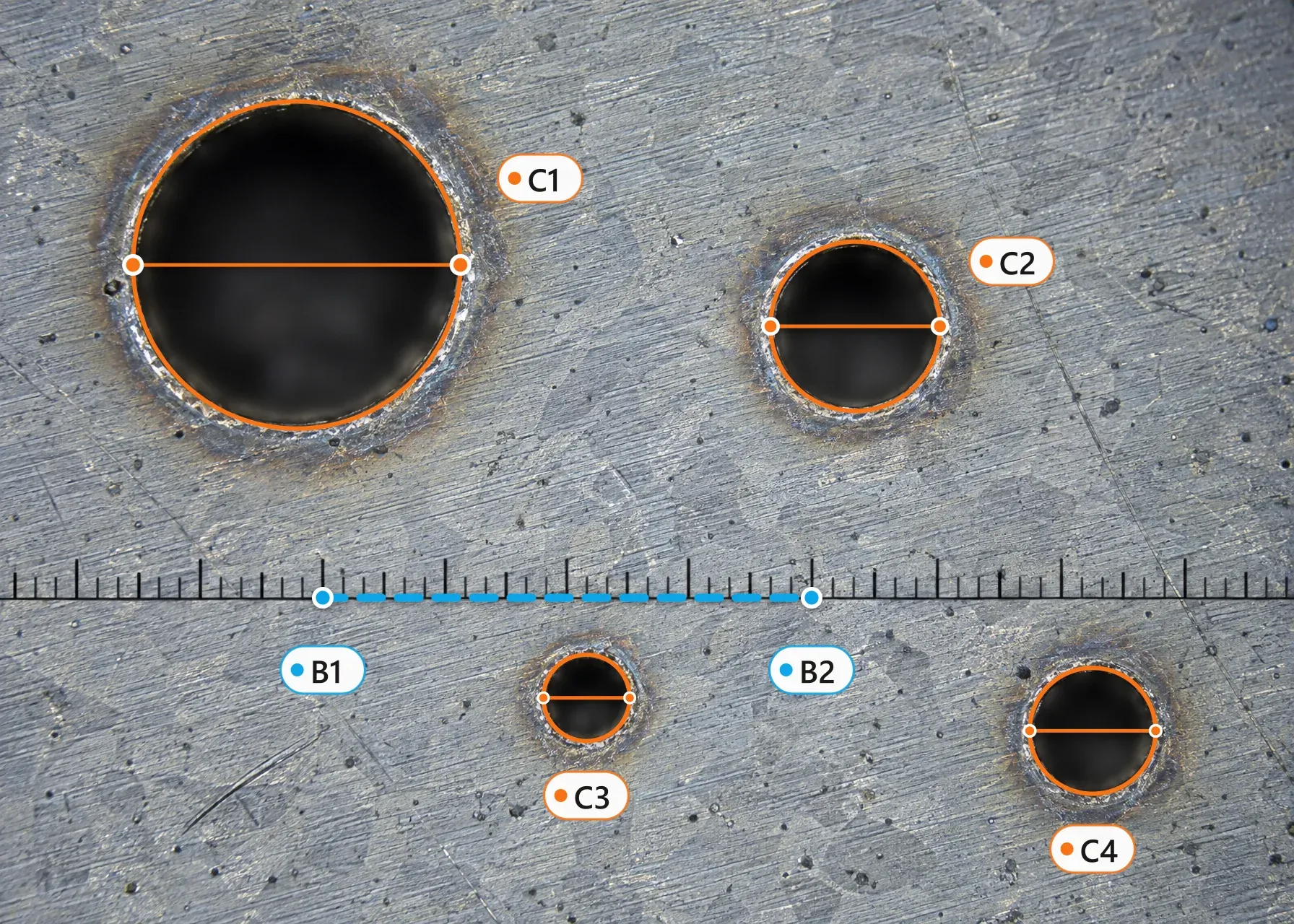
Mark two points (B1 and B2) on something whose size you know — a ruler laid in the shot, a coin, a standard brick — and enter that value with its unit. This one reference sets the scale for everything.

03

Click the two ends of the diameter

Pick the Circle tool and click two opposite points across the round object. The circle commits instantly — the label shows the diameter and area, and clicking it opens the circumference too.

Not quite on target? Drag either point and every value recomputes live. You can also recalibrate at any time — your circles are kept.

One circle, three numbers

Every circle you draw is measured three ways, in the same notation you will see on the canvas and in exported reports.

d

Diameter

The straight span between your two clicks — usually the number you came for: bore sizes, trunk thickness, wheel diameter.

C

Circumference

Computed exactly as π × d. Handy when your real-world cross-check is a tape wrapped around the object.

A

Area

The enclosed area, π × d² ⁄ 4 — for a tank footprint, a round tabletop, or a pipe’s cross-section.

On the canvas, a circle’s label shows the diameter and the area; click the label to open a details dialog with all three values. Need the radius? It’s half the diameter — no extra clicks.

The right tool for round objects

The free Circle tool covers true circles photographed face-on; the PRO Ellipse tool picks up ovals and slightly tilted circles.

Circle — two clicks on the diameter

Click the two ends of the diameter and the circle commits instantly — no third click, no Finish button. You get the diameter, circumference, and area, with handles C1.1 and C1.2 you can drag to fine-tune. Free on every plan, no account needed.

Circle in the full feature tour

Ellipse — for ovals and tilted circlesPRO

Three clicks — the center, one end of the first axis, then the second axis — trace an oval object, or the oval a circle becomes when photographed slightly off square. It reports both axes, the circumference, and the area. A PRO tool.

Ellipse in the full feature tour

From measured diameter to nominal pipe size

Pipes are sold by nominal size (DN / NPS), but a photo gives you the outside diameter. Measure the OD across the pipe end, then find the nearest match below.

Nominal pipe sizes DN 15 to DN 50 with their outside diameters
DNNPSOD (metric)OD (imperial)
DN 151/2″21.3 mm0.840 in
DN 203/4″26.7 mm1.050 in
DN 251″33.4 mm1.315 in
DN 321 1/4″42.2 mm1.660 in
DN 401 1/2″48.3 mm1.900 in
DN 502″60.3 mm2.375 in
Nominal pipe sizes DN 65 to DN 200 with their outside diameters
DNNPSOD (metric)OD (imperial)
DN 652 1/2″73.0 mm2.875 in
DN 803″88.9 mm3.500 in
DN 1004″114.3 mm4.500 in
DN 1255″141.3 mm5.563 in
DN 1506″168.3 mm6.625 in
DN 2008″219.1 mm8.625 in

Outside diameters follow the ASME B36.10 steel-pipe standard. Copper tube, PVC, and electrical conduit use different sizing systems — when in doubt, measure the OD on your photo and check the manufacturer’s chart against it.

When a photographed diameter is accurate

Works well

  • The circular face photographed square-on — looking straight down the axis of the pipe, hole, or cut trunk
  • A calibration reference on the same flat plane as the circle — a ruler or tape laid right next to the object
  • Flat-lay shots, scans, and technical drawings
  • Straight-down photos of round features — manhole covers, tanks, pools

Expect errors

  • Circles photographed at an angle — a tilted circle projects as an oval, and a circle traced over it is a guess
  • A reference sitting closer to or farther from the camera than the object it calibrates
  • Round objects near the edges of wide-angle or fisheye shots, where the lens bends straight lines
  • Cylinders shot obliquely, where the rim reads as an ellipse instead of a circle

A tilted circle can still be traced honestly as the oval it appears to be — that is the Ellipse tool, a PRO feature. The free fix is simpler and more accurate: reshoot with the camera square-on to the circular face.

Units for diameter, circumference, and area

Diameter and circumference come out in any distance unit; the enclosed area uses metric, imperial, or astronomical area units. Switch families any time — values convert instantly.

Distance

Metric

SymbolName
nmnanometer
μmmicrometer
mmmillimeter
cmcentimeter
mmeter
kmkilometer

Imperial

SymbolName
ininch
ftfoot
ydyard
mimile
milmil (thou)

Nautical

SymbolName
ftmfathom
cbcable
nminautical mile

Astronomical

SymbolName
AUastronomical unit
lylight-year
pcparsec

Typography

SymbolName
ptpoint
pcpica

Area

Metric

SymbolName
mm²square millimeter
cm²square centimeter
square meter
km²square kilometer
hahectare

Imperial

SymbolName
in²square inch
ft²square foot
yd²square yard
mi²square mile
acacre

Astronomical

SymbolName
AU²square astronomical unit
ly²square light-year
pc²square parsec

What people measure with it

Anything round, photographed face-on.

Pipes and fittings

Outside diameters of pipe ends, flanges, and fittings — calibrate on a ruler in the shot and read the OD without hunting for a caliper.

Tree trunks and logs

Trunk diameter from a face-on photo of a cut end, or the silhouette width of a standing tree — quick numbers for arborist and firewood estimates.

Wheels and rims

Wheel, rim, and tire diameters from a straight-on photo of the side of a vehicle, a bike, or the wheel itself.

Tanks, drums, and lids

Tank footprints, drum lids, and manhole covers — the diameter for the fit, the area for the footprint, from one straight-down shot.

Holes and bores on drawings

Drill holes, bores, and cutouts on scanned technical drawings, calibrated on a dimensioned edge or the drawing’s scale bar.

Round tables and decor

Tabletops, mirrors, rugs, and planters from listing photos — check whether it fits before you drive out to pick it up.

Frequently asked questions

?How accurate is a diameter measured from a photo?

Accuracy depends on the photo, not the tool. Measurements are reliable when the circular face is photographed square-on and the calibration reference sits on the same flat plane as the object. Photos taken at an angle, references at a different depth, and wide-angle lens edges all introduce error.

?Do I need to calibrate before measuring a diameter?

Yes. A photo carries no scale by itself, so the Circle tool stays disabled until you mark one known distance. The easiest trick: lay a ruler or tape measure flat next to the object before you shoot, then calibrate on it.

?How is the circumference calculated?

From the diameter you measured: circumference = π × diameter. The on-canvas label shows the diameter and area; click the label to open the details dialog with all three values — diameter, circumference, and area.

?Can I get the radius too?

The app reports diameter, circumference, and area. The radius is simply half the measured diameter — no extra clicks needed.

?My round object looks like an oval in the photo — what now?

A circle photographed at an angle projects as an oval. The honest fix is to reshoot with the camera square-on to the circular face. There is also an Ellipse tool (PRO) that traces oval shapes with three clicks and reports both axes, the circumference, and the area.

?Can I measure a pipe when I can’t photograph its end?

Yes — shoot the pipe from the side and measure straight across its silhouette with the Line tool: the silhouette width is the outside diameter. The Circle tool is for when the round face itself is visible.

?What units are supported?

Diameter and circumference come out in any distance unit across five families — metric, imperial, nautical, astronomical, and typography. The enclosed area uses metric (including hectares), imperial (including acres), or astronomical area units.

?Is my photo uploaded to a server?

Not unless you save it. Used as a guest, the app measures entirely in your browser and the image never leaves your device. Saving a project (optional, free account) stores the image securely so you can reopen the project on other devices.

Measure your first diameter — free

Open the tool and try it on the built-in sample image — no sign-up, no install. Two clicks across any round object, three numbers back.