 Amplia
Measure length, height, and area in any image
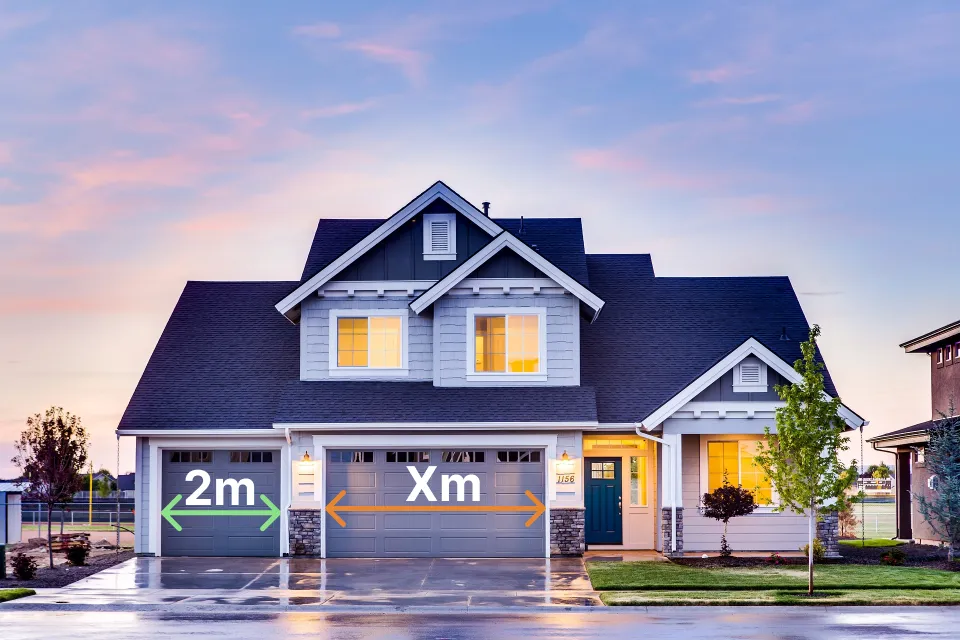
Mark one distance you already know in the image, then measure anything else on the same plane — the height of a building, the width of a door, or the area of a field.
How to measure on an image
Upload your image
Load a photo, plan, drawing, or map — or start with the built-in sample image. Without an account your image never leaves your device and all measuring happens in your browser. If you sign in and save your work as a project, the image is stored securely in the cloud so you can reopen it on another device.
Calibrate with a known distance
Mark two calibration points on something whose real size you already know — a door, a window, or a ruler placed in the shot. Then enter that reference distance and its unit. Amplia works out the scale from it.
Measure anything on the same plane
Draw as many lines, paths, circles, and polygons as you need; each one is converted to real units right away. Measurements are accurate when what you measure lies on the same plane as the calibration reference — that is, at the same distance from the lens.
Measurement tools
Tools for measuring any shape in your image
Line
Click two points to measure the straight-line distance between them. Use it for heights, widths, or any point-to-point distance.
Polyline
Place a series of connected points to trace a path. You get the length of every segment plus the running total — useful for routes, perimeters, and complex outlines.
Circle
Click two points to set the diameter. Amplia gives you the diameter, the circumference, and the enclosed area.
Polygon
Outline any closed shape — a triangle, a rectangle, or an irregular figure with as many points as you need. You get both the perimeter and the area.
PDF export
Save your work as a project and export the drawings and measurements as a PDF. Exports are generated on our servers and need a free account, so you can share the result with clients or keep it for your records.
Works everywhere
The app runs in the browser on any device — phone, tablet, or desktop. Nothing to install.
Supported units
The units Amplia supports, grouped by system and subsystem.
Distance
Metric
| Symbol | Name |
|---|---|
| nm | nanometer |
| μm | micrometer |
| mm | millimeter |
| cm | centimeter |
| m | meter |
| km | kilometer |
| Å | angstrom |
| pm | picometer |
| dm | decimeter |
Imperial
| Symbol | Name |
|---|---|
| in | inch |
| ft | foot |
| yd | yard |
| mi | mile |
| mil | mil (thou) |
Nautical
| Symbol | Name |
|---|---|
| ftm | fathom |
| cb | cable |
| nmi | nautical mile |
Astronomical
| Symbol | Name |
|---|---|
| AU | astronomical unit |
| ly | light-year |
| pc | parsec |
| ls | light-second |
| lmin | light-minute |
| kpc | kiloparsec |
| Mpc | megaparsec |
| Gpc | gigaparsec |
Typography
| Symbol | Name |
|---|---|
| pt | point |
| pc | pica |
Surveying
| Symbol | Name |
|---|---|
| li | link |
| rd | rod (perch) |
| ch | chain |
| fur | furlong |
Area
Metric
| Symbol | Name |
|---|---|
| mm² | square millimeter |
| cm² | square centimeter |
| m² | square meter |
| km² | square kilometer |
| ha | hectare |
| nm² | square nanometer |
| μm² | square micrometer |
| Ų | square angstrom |
| a | are |
| pm² | square picometer |
| dm² | square decimeter |
Imperial
| Symbol | Name |
|---|---|
| in² | square inch |
| ft² | square foot |
| yd² | square yard |
| mi² | square mile |
| ac | acre |
| mil² | square mil |
Astronomical
| Symbol | Name |
|---|---|
| AU² | square astronomical unit |
| ly² | square light-year |
| pc² | square parsec |
| ls² | square light-second |
| lmin² | square light-minute |
| kpc² | square kiloparsec |
| Mpc² | square megaparsec |
| Gpc² | square gigaparsec |
Surveying
| Symbol | Name |
|---|---|
| rd² | square rod |
| ch² | square chain |
| ro | rood |
Nautical
| Symbol | Name |
|---|---|
| nmi² | square nautical mile |
Time
Standard (SI)
| Symbol | Name |
|---|---|
| ms | millisecond |
| s | second |
| ns | nanosecond |
| μs | microsecond |
| min | minute |
| h | hour |
| d | day |
Astronomical
| Symbol | Name |
|---|---|
| JD | Julian day |
| JY | Julian year |
| JC | Julian century |
When does it work well?
When it works well
Proportional measurement works well when the photo is taken straight on, with little distortion. If the object is flat and the camera is square to it, the proportions stay accurate.
It also works well when you have a clear reference to calibrate against — a door, a window, or a ruler placed in the shot. That makes it a good fit for technical images, product photos, and construction plans, where the scale is easy to establish.
When it works poorly
This method works poorly when the photo has perspective distortion — when the camera is at an angle to the subject, or too close to it. It also struggles with three-dimensional objects shot from a single photo, because depth changes the scale across the frame.
Wide-angle and phone lenses can bend straight lines, which distorts the proportions. And because everything is derived from your calibration, an inaccurate reference distance makes every other measurement wrong by the same factor.
Architects
Measure building elements or floor plans from images when the drawings are not to scale.
Construction workers
Estimate wall height, window size, or distances from site photos before work begins.
Engineers
Check the dimensions of machines or structures from a photo using a single reference distance.
Interior designers
Measure furniture and room elements in photos to plan layouts and use of space.
Frequently asked questions
?How accurate is measuring on an image?
Accuracy depends on the photo and how it was taken. When the camera is square to the subject, lens distortion is minimal, and the reference distance is accurate, measurements can be very precise. Perspective and wide-angle lenses reduce accuracy.
?Is my image uploaded to a server?
Not when you measure without an account — the image stays on your device and everything happens in your browser. If you sign in and save your work as a project, the image and its measurements are stored securely in the cloud so you can reopen the project on another device and share it. You can delete a project, and its image, at any time.
?What units of measurement are supported?
Amplia has a fixed catalog of units and you pick one when you calibrate. Distance covers metric (nanometer to kilometer), imperial (inch, foot, yard, mile), nautical, astronomical, and typography units; area covers metric, imperial, and astronomical. Every measurement is then shown in the system you chose — the full list is further down this page.
?Can I measure on a photo from my phone?
Yes. The app runs in any modern mobile browser. Take a photo with your phone, open it in the app, and start measuring. The touch interface supports pinch-to-zoom, so you can place points precisely.
?How does proportional measurement work?
You mark two calibration points on something of known size and enter that real-world distance. Amplia works out a scale ratio from it, then uses that ratio to convert the pixel distance of every new measurement into real-world units.